VSCode编写Cpp使用system函数导致异常退出,解决办法

2021年 7月 2日


问题描述

VSCode运行代码,默认是使用集成控制台的。

C++中调用的 system() 函数可能会导致程序异常退出。例如:

1
2
3
4
5
6
7
8
9
10
11
12
13
14
15
16
17
18
19
20
21
22
23
24
25
26
27
28
29
30
31
/**
* 主菜单界面显示
*/
short homeMenu()
{
short code = 0;

system("cls");

cout << "------------------------"
<< "通讯录管理系统"
<< "------------------------" << endl
<< endl;

cout << "\t\t\t1、添加联系人" << endl
<< "\t\t\t2、显示联系人" << endl
<< "\t\t\t3、删除联系人" << endl
<< "\t\t\t4、查找联系人" << endl
<< "\t\t\t5、修改联系人" << endl
<< "\t\t\t6、清空联系人" << endl
<< "\t\t\t0、退出通讯录" << endl
<< endl;

cout << "请选择(0~6):";
cin >> code;
getchar();
cout << endl;

return code;
}

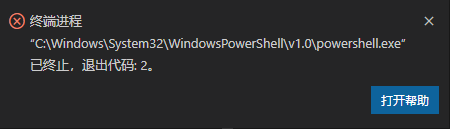
提示信息:

VSCode任务异常终止代码2

估计是集成控制台不支持这个函数。

解决办法

.vscode/launch.json 文件中,将

1
2
3
4
5
6
"configurations": [
{
"externalConsole": false,
}
]

改为

1
2
3
4
5
6
"configurations": [
{
"externalConsole": true,
}
]

使用生成黑窗口的系统控制台运行代码,即可解决。

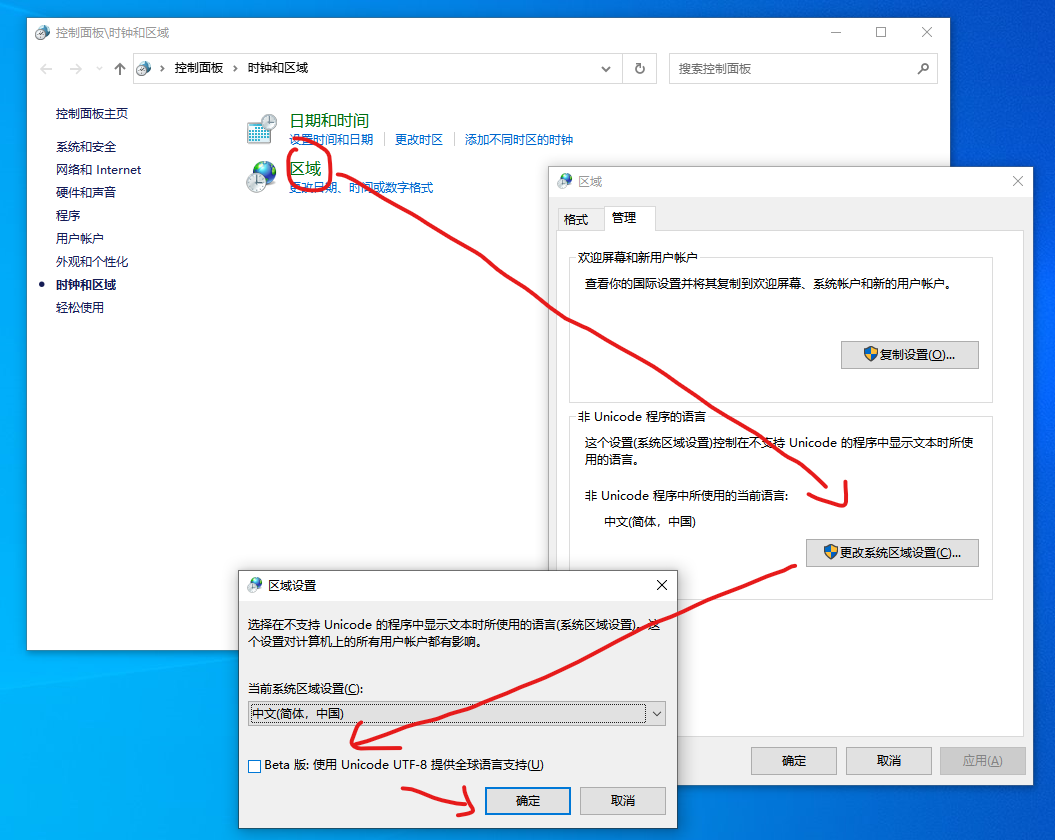
CMD 乱码从根本上解决:

Windows10系统全局修改UTF-8


Comments: